
enum 타입
enumeration
자바스크립트에는 없고 타입스크립트에만 있는 타입
enum은 특정 값들의 집합을 의미하는 자료형!
✅ 숫자형 이넘
enum Direction {
  Up,
  Down,
  Left,
  Right,
}
// 내부적으로는 0, 1, 2, 3 숫자가 매겨짐

console.log(Direction.UP, Direction.Down, Direction.Left) // 0 1 2

const up: Direction = Direction.Up;
// Direction = Direction.UP | Direction.Down | Direction.Left | Direction.Right
const leftOrRight: Direction.Left | Direction.Right = Direction.Left;

// +)

enum Direction {
  Up = 1,
  Down,
  Left,
  Right,
}

console.log(Direction.UP, Direction.Down, Direction.Left); // 1 2 3
console.log(Direction[2]); // Down
✅ 문자형 이넘
enum Direction {
    Up = "UP",
    Down = "DOWN",
    Left = "LEFT",
    Right = "RIGHT",
}

// 문자형은 Up = 0으로 Up에 0을 할당했을 경우,
// Down부터 자동으로 +1이 되는 auto incrementing이 없음
✅ 복합 이넘
enum BooleanLikeHeterogeneousEnum {
    No = 0,
    Yes = "YES",
}
// 유지보수에 좋지 않아 권고하지 않음
유니온(Union) 타입 : (A || B)
: 자바스크립트의 OR 연산자 || 와 같은 의미
const printOut = (input: string | number) => {
	console.log(input);
}

printOut('문자열');
printOut(20);
printOut(true); // string 또는 number타입이기 때문에 boolean 타입인 true를 할당할 때 오류 발생
| 연산자를 이용하여 타입을 여러 개 연결하는 방식!
✅ 유니온 타입의 장점
function getAge(age: any) {
  age.toFixed(); // Error
  return age;
}

getAge('20'); // Error
getAge(20);
toFixed는 소수점 관련 메소드라 age가 숫자일때만 실행가능 + 다른 자료형이 들어오면 Error 발생
=> typeof 연산자와 유니온 타입을 사용하면 number 또는 string 모두 사용 가능 ↓
function getAge(age: number | string) {
  if (typeof age === 'number') {
    age.toFixed();
    return age;
  }
  if (typeof age === 'string') {
    return age;
  }
}

getAge('20');
getAge(20);
padding parameter에 any 타입을 사용하면 컴파일을 하기 전까지 Error 유무를 알 수 없는데, 유니온 타입을 사용해 number 또는 string 를 사용할 수 있다고 지정해 주면(padding: string | number) true 부분에 빨간 밑줄로 컴파일 전 Error 요소를 알려줌 ↓
function padLeft(value: string, padding: string | number) {
  if (typeof padding === 'number') {
    return Array(padding + 1).join(' ') + value;
  }
  if (typeof padding === 'string') {
    return padding + value;
  }
  throw new Error(`Expected string or number, got '${padding}'.`);
}

console.log(padLeft('Hello world', 4)); // "    Hello world"
console.log(padLeft('Hello world', '!!!')); // "!!!Hello world"
console.log(padLeft('Hello world', true)); // true 에 빨간 밑줄로 Error 발생을 알려줌
Type Alias 타입 별칭 (사용자 정의 타입)
const hero1: { name: string; power: number; height: number } = {
  name: '슈퍼맨',
  power: 1000,
  height: 190,
};

const printHero = (hero: { name: string; power: number; height: number }) => {
  console.log(hero.name, hero.power);
};

console.log(printHero(hero1)); // 슈퍼맨 1000
매번 타입을 새로 작성하는 건 번거롭고 재사용이 불가능하기 때문에 Type Alias 사용 ↓
// type.ts

type Hero = {
	name: string;
	power: number;
	height: number;
    	gender: '남' | '여';
};
import type { Hero } from './type';
const hero1: Hero = {
name: '슈퍼맨',
power: 1000,
height: 190,
gender: '남'
};
const printHero = (hero: Hero) => {
console.log(hero.name, hero.power);
};
console.log(printHero(hero1));type Direction = 'UP' | 'DOWN' | 'LEFT' | 'RIGHT';
const printDirection = (direction: Direction) => {
console.log(direction);
};
printDirection('UP');
printDirection('UP!');
interface & Intersection Type
기본 정의
interface Person {
  name: string;
  age: number;
}

const person1: Person = { name: 'js', age: 20 };
const person2: Person = { name: 'ljs', age: 'twenty' }; // Error
선택 속성
interface Person {
  name: string;
  age?: number;
}

const person1: Person = { name: 'js', age: 18 };
const person1: Person = { name: 'js' }; // age가 들어가지 않아도 됨
Read only 속성 : interface로 객체를 처음에 생성할 때만 값을 할당할 수 있고 그 이후에는 변경할 수 없는 속성
interface Person {
  readonly name: string;
  age?: number;
}

const person1: Person = { name: 'js' };
person1.name = 'ljs'; // Error

let readOnlyArr: ReadonlyArray<number> = [1,2,3];
readOnlyArr.splice(0,1); // error
readOnlyArr.push(4); // error
readOnlyArr[0] = 100; // error
index type : 속성 이름을 구체적으로 정의하지 않고 어떤 값의 타입만 정의
interface Person {
  readonly name: string;
  [key: string]: string | number; // [key: string] key에 어떤 string이든 들어올 수 있음
}
// index key에는 string이, value에는 string 또는 number(string | number)가 들어올 수 있음
// key는 무조건 string, number만 올 수 있음

const p1: Person = { name: 'js', birthday: '비밀', age: 20 };
// birthday: string 을 적지 않았어도 birthday property를 적을 수 있음
함수 타입
interface Print {
  (name: string, age: number): string;
}
// 매개변수(name: string, age: number) : 반환타입(string)

// type Print = (name: string, age: number) => string;

const getNameAndAge: Print = function (name, age) {
  return `name: ${name}, age: ${age}`;
};
인터페이스 확장
1)
interface Person {
  name: string;
  age: number;
}

2)
interface Korean extends Person {
  birth: 'KOR';
}

3)
interface Korean {
  name: string;
  age: number;
  birth: 'KOR';
}

// 2) 는 3)과 같다!!

interface Developer {
  job: 'developer';
}

interface KorAndDev extends Korean, Developer {}

interface KorAndDev {
  name: string;
  age: number;
  birth: 'KOR';
  job: 'developer';
}
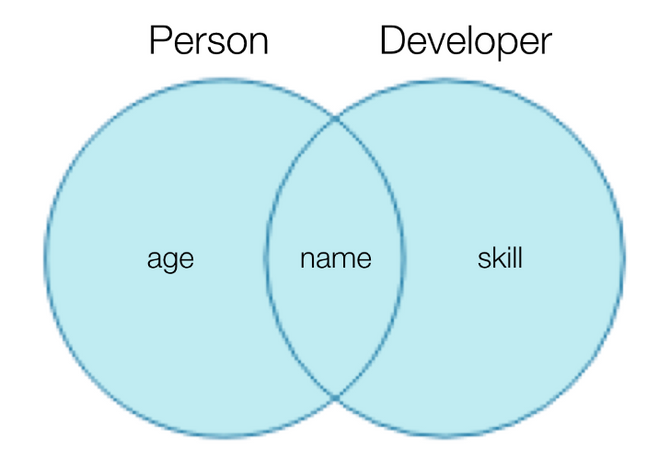
intersection Type : 여러 타입을 모두 만족하는 하나의 타입
interface Person {
  name: string;
  age: number;
}

interface Developer {
  name: string;
  skill: string;
}

type DevJob = Person & Developer;

const nbcPerson: DevJob = {
  name: 'a',
  age: 20,
  skill: 'ts',
};
type vs interface
타입 별칭과 인터페이스의 가장 큰 차이점은 타입의 확장 가능 / 불가능 여부
인터페이스는 확장이 가능한데 반해 타입 별칭은 확장이 불가능함
따라서, 가능한한 type 보다는 interface로 선언해서 사용하는 것을 추천!
'스파르타 개발일지' 카테고리의 다른 글
| 20230209 steam api 연결하는데 CORS 문제 발생.. (0) | 2023.02.09 |
|---|---|
| 20230118 타입스크립트 03 (0) | 2023.01.18 |
| 20230116 타입스크립트 01 (0) | 2023.01.16 |
| 20221229 리액트 네이티브 시작! (0) | 2022.12.29 |
| 개발일지 20221213 리액트 숙련 강의 2 (0) | 2022.12.13 |